> ## Documentation Index
> Fetch the complete documentation index at: https://docs.brikl.co/llms.txt
> Use this file to discover all available pages before exploring further.
# Fashionshop
Intermediate Level : Intermediate level of Bubble experience with standard design, workflow and data requirements.
 ## Overview
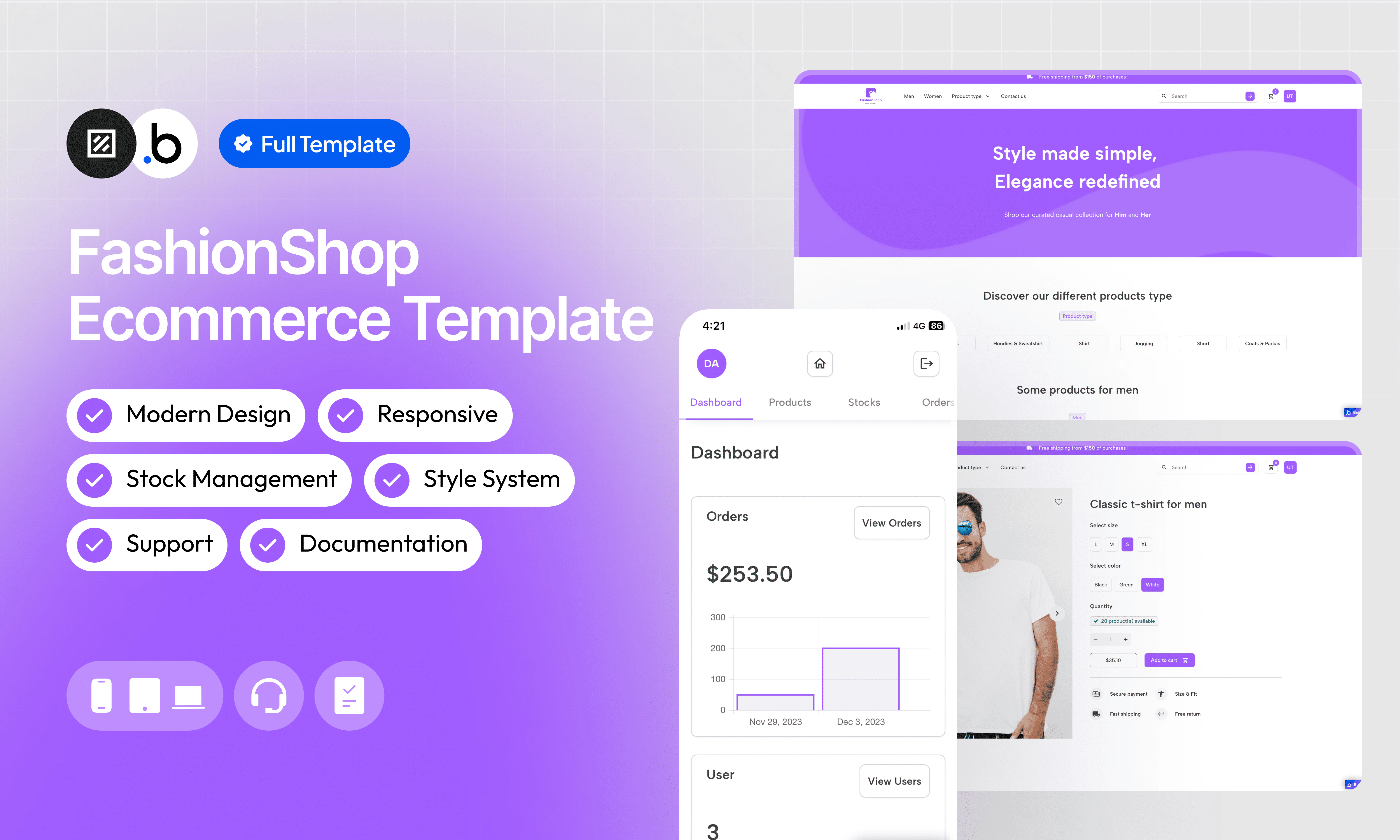
FashionShop is a complete, ready-to-use e-commerce template for clothing. It covers the entire customer journey, from sign-up with email verification through product browsing, cart management, checkout, and order tracking — all the way to platform administration. Focus on your catalog rather than building infrastructure from scratch.
The template includes dedicated dashboards for customers and administrators, an automatic inventory update system on each purchase, a fully responsive design that adapts to all screen sizes, and a predefined style system to accelerate customization. It also comes with full documentation and reactive support to help you get up and running fast.
## Functionalities
Set up a robust enrollment system with email verification to ensure the security and validity of accounts.
Manage your store with ease with an intuitive admin dashboard. Control products, orders, and track performance at a glance.
Save time in design with a predefined style system. Harmonize the look of your shop effortlessly.
Simplify inventory management with an automatic update on each purchase. Avoid out-of-stock situations and ensure a smooth shopping experience.
Quickly add new products to your catalog without difficulty. Grow your store without worrying about technical complexities.
Enjoy an exceptional user experience, whether for customers browsing your store or administrators managing the backend. FashionShop adapts to all screens, ensuring smooth operation on all devices.
Access detailed documentation that covers all the platform's features, making it easy to get started and use.
Get responsive and professional technical support to quickly resolve all your questions and concerns.
## Allow Access
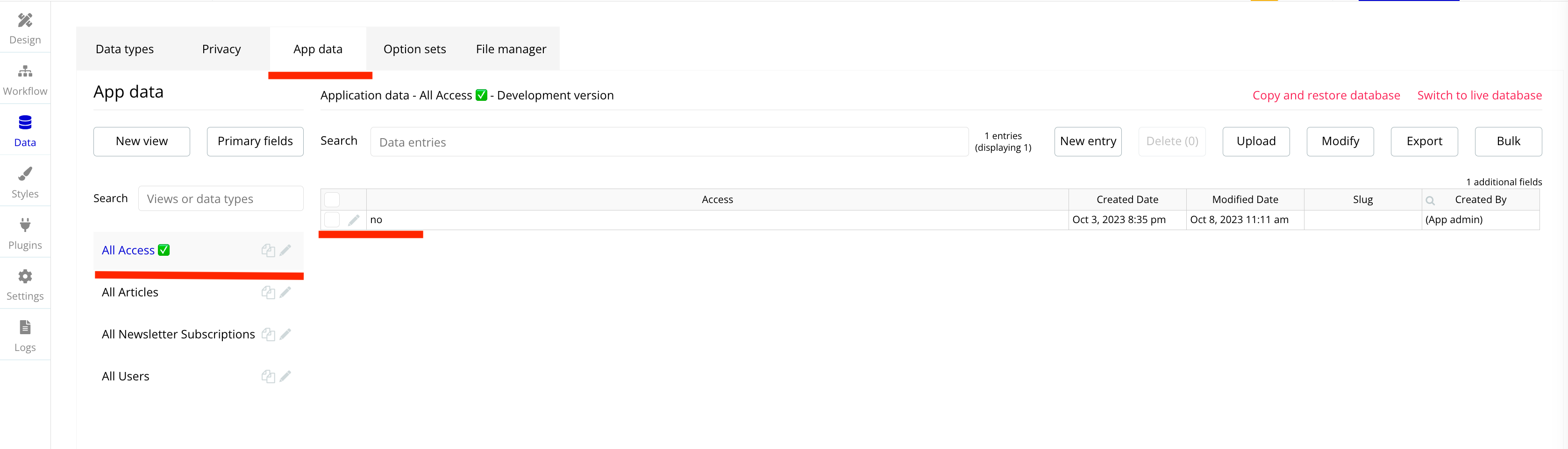
This section explains how to unlock the template’s features. The restriction is intentionally in place to prevent users from adding or modifying data in the preview version. This ensures that no sensitive or inappropriate content can be displayed to other people viewing the template in the Bubble Marketplace.
In order to access all the features of this template, you will need to purchase it and follow the following steps.
## Overview
FashionShop is a complete, ready-to-use e-commerce template for clothing. It covers the entire customer journey, from sign-up with email verification through product browsing, cart management, checkout, and order tracking — all the way to platform administration. Focus on your catalog rather than building infrastructure from scratch.
The template includes dedicated dashboards for customers and administrators, an automatic inventory update system on each purchase, a fully responsive design that adapts to all screen sizes, and a predefined style system to accelerate customization. It also comes with full documentation and reactive support to help you get up and running fast.
## Functionalities
Set up a robust enrollment system with email verification to ensure the security and validity of accounts.
Manage your store with ease with an intuitive admin dashboard. Control products, orders, and track performance at a glance.
Save time in design with a predefined style system. Harmonize the look of your shop effortlessly.
Simplify inventory management with an automatic update on each purchase. Avoid out-of-stock situations and ensure a smooth shopping experience.
Quickly add new products to your catalog without difficulty. Grow your store without worrying about technical complexities.
Enjoy an exceptional user experience, whether for customers browsing your store or administrators managing the backend. FashionShop adapts to all screens, ensuring smooth operation on all devices.
Access detailed documentation that covers all the platform's features, making it easy to get started and use.
Get responsive and professional technical support to quickly resolve all your questions and concerns.
## Allow Access
This section explains how to unlock the template’s features. The restriction is intentionally in place to prevent users from adding or modifying data in the preview version. This ensures that no sensitive or inappropriate content can be displayed to other people viewing the template in the Bubble Marketplace.
In order to access all the features of this template, you will need to purchase it and follow the following steps.


 ## Pages
Home page displaying all published products, with a newsletter subscription system to capture and retain visitors.
The page that allows customers to find products precisely thanks to a filtering system by gender, type, price, and more.
The page that details a specific product with photos, available colors and sizes, a description, and customer reviews.
The page that groups all the products added by the user to their shopping cart, with a subtotal summary before checkout.
The page that allows customers to enter their delivery and billing information, select a delivery option, and validate their order.
The page dedicated to platform administrators, where they can manage products, stocks, orders, users, reviews, and newsletter subscriptions.
The page dedicated to registered customers, where they can manage their personal information, view their orders, and access their wishlist.
The page that details the history, vision, and mission of your company.
The page where customers can contact you and ask specific questions. The platform administrator receives an email when each form is submitted.
The page that details the return and refund policy of the platform.
The page that details the terms and conditions of the platform.
The page that allows users to register on the platform (client and administrators).
The page that allows users to log in to the platform (client and administrators).
The page that allows users to verify their email address via a code sent by email.
The page that allows users to reset their password.
A fully customized error page displayed when a user tries to access a non-existing page, with links back to the main sections of the site.
## Reusable Elements
A collection of shared components built to be used across multiple pages, helping maintain design consistency while making updates and scaling more efficient.
A reusable element creates an element that contains other elements, like a group, that can be used in more than one place. This is useful when reusing the same elements often. Using reusable elements keeps the app smaller and makes it easier to edit.
The header is a reusable element present on all pages of the platform. It includes the store logo, navigation links by product type, search input to find products by name, and buttons to log in or register. A mobile menu icon appears depending on screen size and contains all the same elements.
The footer is a reusable element located at the bottom of each page. It features navigation links redirecting to important pages such as Contact us, Terms & Conditions, Returns & Refunds, and social network links.
The FAQ is a reusable element positioned on certain pages such as the Checkout, so that customers can quickly find answers to their most common questions without leaving the page.
The Popup Access informs users who preview the template that some features are limited until the template is purchased.
## Workflows
This structure uses folders and colors to organize workflows clearly, improve readability, and ensure consistent logic management across the application.
In Bubble, workflows define how an application behaves. They are triggered by events and run actions that manage data, navigation, and user interactions.
### Folders
Folders are structured by functional category, with each folder grouping workflows related to a specific domain of the application. This approach ensures that every type of logic has its dedicated space, making the overall workflow architecture clearer, more organized, and easier to maintain.
This folder contains workflows responsible for creating, updating, deleting, and managing data within the application. It centralizes all logic that interacts directly with the database to ensure structured and consistent data handling.
This folder groups workflows that control page transitions, redirects, and user journeys. It defines how users move through the application and ensures a clear and predictable flow.
This folder includes workflows that depend on external plugins or third party integrations. It isolates plugin related logic to keep the core application structure clean and organized.
This folder contains workflows that affect the user interface, such as showing or hiding elements, triggering animations, or dynamically updating what the user sees. It manages front end behavior without altering stored data.
This folder groups workflows that manage temporary front end data stored in custom states. It is used to control dynamic interactions and interface logic without impacting the database.
Custom states are variables that you can save on any element on the page, including the page itself. They let you store data temporarily that is reset when the page is reloaded. This is useful when you need your app to remember some information that you don’t need to store permanently in the database.
This folder includes workflows dedicated to sending automated or transactional emails. It centralizes communication logic to ensure consistency and easier maintenance.
This folder contains workflows that handle external API calls and data exchanges with outside services. It organizes integration logic and keeps external communication clearly separated from internal processes.
### Colors
Colors are used as visual indicators to distinguish workflow types and intentions. Each color corresponds to a specific category of action, allowing quick recognition of the workflow’s purpose and improving readability across the entire logic structure.
Blue is used for workflows involving navigation, such as redirects to other pages or links.
Green indicates workflows involving the database, such as creating or updating data in the database or the registration/connection system.
Red indicates workflows that have an impact on deleting data or resetting values.
Orange is reserved for visual elements, such as showing or disappearing pop-ups, floating groups, and other such interactive elements.
This color is reserved for elements related to APIs and Plugins.
The Cyan color indicates specific interactions triggered by custom events or custom states.
Brown is use for email send
## Datatypes
The database consists of different **data types** that you as the developer plan and set up. Data types are like containers that hold specific types of information and each data type is made up of **fields** where that information is stored.
### Access
| Field Name | Type | Note |
| ---------- | -------- | -------------------------------------------------------------- |
| Access ✅ | `yes/no` | Whether or not certain features of the template are accessible |
### Users
| Field Name | Type | Note |
| ----------------- | -------------------------------- | -------------------------------------------------------------------------- |
| First Name | `text` | Contains the user's first name |
| Last Name | `text` | Contains the user's last name |
| Phone | `number` | Contains the user's phone number |
| **Account Type** | **`Account Type (Option Sets)`** | **Contains the user's account type** |
| Verification Code | `text` | Contains the verification code received by the user |
| Expiration Code | `date` | Contains the verification period |
| Agree Terms | `yes/no` | Indicates whether the user agrees with the platform's terms and conditions |
| **Wishlist** | **`List of Products`** | **Contains products saved as favorites by the user** |
### Shipping Addresses
| Field Name | Type | Note |
| ----------------------- | -------- | ------------------------------------------------------------- |
| Shipping First Name | `text` | Contains the first name of the user who receives the delivery |
| Shipping Last Name | `text` | Contains the last name of the user receiving the delivery |
| Shipping City | `text` | Contains the user's shipping city |
| Shipping Country/Region | `text` | Contains the user's country of shipping |
| Shipping Postal Code | `text` | Contains the user's shipping postal code |
| Shipping Phone | `number` | Contains the phone number of the user receiving the delivery |
| Delivery Instruction | `text` | Contains user delivery instructions |
### Billing Addresses
| Field Name | Type | Note |
| ---------------------- | ------ | ------------------------------------------------------------ |
| Billing First Name | `text` | Contains the first name of the user who receives the invoice |
| Billing Last Name | `text` | Contains the last name of the user who receives the invoice |
| Billing City | `text` | Contains the city of the user's billing address |
| Billing Country/Region | `text` | Contains the country of the user's billing address |
| Billing Postal Code | `text` | Contains the postal code of the user's billing address |
| Billing Street Address | `text` | Contains the billing address street |
### Products
| Field Name | Type | Note |
| ------------ | ---------------- | ------------------------------------------------------ |
| Product Name | `text` | Contains the name of the product |
| Gender | `text` | Contains the gender of the product (Men or Women) |
| Price | `number` | Contains the initial price of the product |
| Discount | `number` | Contains the discount applied on the price |
| Description | `text` | Contains the full product description |
| Images | `List of Images` | Contains all images of the product |
| Product Type | `text` | Contains the type of product (T-shirt, Jeans, Hoodie…) |
### Stocks
| Field Name | Type | Note |
| ---------------- | ---------------- | --------------------------------------------------------------------------------------- |
| Color | `text` | Contains the color of the product |
| Size | `text` | Contains the size of the product |
| Quantity | `number` | Contains the product quantity for the selected size and color |
| Quantity Updated | `number` | Contains the number of products ordered that will be subtracted from the Quantity field |
| **Product** | **`Product ID`** | **Contains the product concerned by this stock entry** |
### Carts
| Field Name | Type | Note |
| ----------- | ---------------- | ---------------------------------------------------------------- |
| Color | `text` | Contains the color of the product selected by the user |
| Size | `text` | Contains the size of the product selected by the customer |
| Quantity | `number` | Contains the quantity of the product selected by the user |
| Ordered | `yes/no` | Indicates whether this shopping cart has been ordered or not |
| Subtotal | `number` | Contains the total of the shopping cart (excluding other fees) |
| **Product** | **`Product ID`** | **Contains the product placed in the shopping cart by the user** |
| **Stock** | **`Stock ID`** | **Contains the stock ID selected by the customer** |
### Orders
| Field Name | Type | Note |
| -------------------- | ------------------------- | --------------------------------------------------------- |
| Max Delay | `date` | Indicates the maximum delivery date |
| Min Delay | `date` | Indicates the minimum delivery date |
| **Order Statut** | **`Order Status`** | **Indicates the current status of the order** |
| **Delivery Option** | **`Delivery Option`** | **Contains the delivery option selected by the user** |
| **Products** | **`List of Carts`** | **Contains all the details of the shopping cart ordered** |
| **Billing Address** | **`Billing Address ID`** | **Contains the billing address selected by the user** |
| **Shipping Address** | **`Shipping Address ID`** | **Contains the shipping address selected by the user** |
### Reviews
| Field Name | Type | Note |
| ----------- | ---------------- | -------------------------------------------- |
| Comments | `text` | Contains the comment left by the user |
| Rating | `number` | Contains the rating left by the user |
| **Product** | **`Product ID`** | **Contains the product that has been rated** |
### Newsletter Subscriptions
| Field Name | Type | Note |
| ---------- | ------ | --------------------------------------------------------------- |
| Email | `text` | Contains the email of the user who subscribed to the newsletter |
| Name | `text` | Contains the name of the user who subscribed to the newsletter |
## Option Sets
This section covers option sets, used to store a static list of options in a database-like structure
Option sets let you set up different types of static options in a database-like structure, but without using the database. This is useful to store information like days of the week, marital status, colors, states, countries and other data that you want to load quickly and that’s rarely updated.
### Account Type
Lists the different account roles available on the platform.
| Attributes | Type | Note |
| ---------- | ------ | ----------------------------- |
| Display | `text` | The label shown for each role |
* Client
* Admin
### Dashboard Admin
Defines the navigation tabs displayed in the admin dashboard.
| Attributes | Type | Note |
| ----------- | ------- | --------------------------------------- |
| Display | `text` | The label shown for each tab |
| Icon Grey | `image` | The grey icon associated with the tab |
| Icon Purple | `image` | The purple icon associated with the tab |
* Dashboard
* Products
* Stocks
* Orders
* Users
* Reviews
* Newsletter
### Dashboard Client
Defines the navigation tabs displayed in the client dashboard.
| Attributes | Type | Note |
| ----------- | ------- | --------------------------------------- |
| Display | `text` | The label shown for each tab |
| Icon Grey | `image` | The grey icon associated with the tab |
| Icon Purple | `image` | The purple icon associated with the tab |
* Informations
* Orders
* Wishlist
### FAQ
Stores the questions and answers displayed in the FAQ reusable element.
| Attributes | Type | Note |
| ---------- | ------ | -------------------------- |
| Display | `text` | The question text |
| Answer | `text` | The answer to the question |
* What countries do you ship to?
* What is your return/exchange policy?
* How long will it take to get my order?
* What payment methods do you accept?
* How long does order processing take?
* What if my order arrives damaged?
### Orders Status
Tracks the current status of an order throughout its lifecycle.
| Attributes | Type | Note |
| ---------- | ------ | ---------------- |
| Display | `text` | The status label |
* Active
* Cancelled
### Delivery Option
Lists the available delivery options with their associated costs and delays.
| Attributes | Type | Note |
| ---------- | -------- | --------------------------------------- |
| Display | `text` | The delivery option label |
| Cost | `number` | The cost of the delivery option |
| Max Delay | `number` | The maximum number of days for delivery |
| Min Delay | `number` | The minimum number of days for delivery |
* Free Shipping
* Standard
* Priority
### Gender
Lists the gender filters available for products.
| Attributes | Type | Note |
| ---------- | ------ | ---------------- |
| Display | `text` | The gender label |
* Men
* Women
### Size
Lists the clothing sizes available across products.
| Attributes | Type | Note |
| ---------- | ------ | -------------- |
| Display | `text` | The size label |
* XS
* S
* M
* L
* XL
### Color
Lists the available colors for product stocks.
| Attributes | Type | Note |
| ---------- | ------ | --------------- |
| Display | `text` | The color label |
* Purple
* Red
* White
* Black
* Blue
* Yellow
* Orange
* Green
* Pink
* Grey
### Product Type
Lists the clothing categories available on the platform.
| Attributes | Type | Note |
| ---------- | ------ | ---------------------- |
| Display | `text` | The product type label |
* T-shirt & Polos
* Jeans
* Hoodies & Sweatshirt
* Shirt
* Jogging
* Short
* Coats & Parkas
### Product Page
Defines the tabs displayed on the product detail page.
| Attributes | Type | Note |
| ---------- | ------ | ------------- |
| Display | `text` | The tab label |
* Description
* Reviews
## Plugins
An overview of the external plugins integrated into the application to extend its native capabilities and enhance specific features or functionalities.
You might need to install these plugins when using the template.
### Air Copy To Clipboard
Free
The Air Copy to Clipboard plugin allows users to copy text to the clipboard with a single action.
### Google Material Icons
Free
Add Google Material Icons to your application and customize their size, color, and appearance.
### Animated Rating Stars
Free
Add animated star rating input with configurable size, colors, and default value. Supports static and interactive modes, user interaction events, responsive layout, and rating reset actions.
### Chart Element
Free
Add a chart element to your application. You can display line, bar charts or polar charts.
### Multi-File Uploader - Dropzone
Free
Allow users to upload multiple files at once using a drag-and-drop interface. Ideal for product image management in the admin dashboard.
### Reveal & Hide Password
Free
Toggle password visibility in Bubble input fields using a reveal/hide icon. Supports icon size, color, position, default visibility state, multiple inputs, and dynamic control with minimal setup.
### Rich Text Editor
Free
Enable your users to write rich, formatted text in an input. Compatible with text elements and email.
## Refund Policy
This policy defines the conditions under which refunds may be requested for our products. It distinguishes between templates distributed through the Bubble Marketplace and the Brikl Chrome Extension, specifying the applicable deadlines, eligibility requirements, and usage-related limitations for each.
## Support
Your satisfaction is our priority. Do not hesitate to contact us if you have any questions or problems.
[support@brikl.co](mailto:support@brikl.co)
[https://www.brikl.co/](https://www.brikl.co/)
## Pages
Home page displaying all published products, with a newsletter subscription system to capture and retain visitors.
The page that allows customers to find products precisely thanks to a filtering system by gender, type, price, and more.
The page that details a specific product with photos, available colors and sizes, a description, and customer reviews.
The page that groups all the products added by the user to their shopping cart, with a subtotal summary before checkout.
The page that allows customers to enter their delivery and billing information, select a delivery option, and validate their order.
The page dedicated to platform administrators, where they can manage products, stocks, orders, users, reviews, and newsletter subscriptions.
The page dedicated to registered customers, where they can manage their personal information, view their orders, and access their wishlist.
The page that details the history, vision, and mission of your company.
The page where customers can contact you and ask specific questions. The platform administrator receives an email when each form is submitted.
The page that details the return and refund policy of the platform.
The page that details the terms and conditions of the platform.
The page that allows users to register on the platform (client and administrators).
The page that allows users to log in to the platform (client and administrators).
The page that allows users to verify their email address via a code sent by email.
The page that allows users to reset their password.
A fully customized error page displayed when a user tries to access a non-existing page, with links back to the main sections of the site.
## Reusable Elements
A collection of shared components built to be used across multiple pages, helping maintain design consistency while making updates and scaling more efficient.
A reusable element creates an element that contains other elements, like a group, that can be used in more than one place. This is useful when reusing the same elements often. Using reusable elements keeps the app smaller and makes it easier to edit.
The header is a reusable element present on all pages of the platform. It includes the store logo, navigation links by product type, search input to find products by name, and buttons to log in or register. A mobile menu icon appears depending on screen size and contains all the same elements.
The footer is a reusable element located at the bottom of each page. It features navigation links redirecting to important pages such as Contact us, Terms & Conditions, Returns & Refunds, and social network links.
The FAQ is a reusable element positioned on certain pages such as the Checkout, so that customers can quickly find answers to their most common questions without leaving the page.
The Popup Access informs users who preview the template that some features are limited until the template is purchased.
## Workflows
This structure uses folders and colors to organize workflows clearly, improve readability, and ensure consistent logic management across the application.
In Bubble, workflows define how an application behaves. They are triggered by events and run actions that manage data, navigation, and user interactions.
### Folders
Folders are structured by functional category, with each folder grouping workflows related to a specific domain of the application. This approach ensures that every type of logic has its dedicated space, making the overall workflow architecture clearer, more organized, and easier to maintain.
This folder contains workflows responsible for creating, updating, deleting, and managing data within the application. It centralizes all logic that interacts directly with the database to ensure structured and consistent data handling.
This folder groups workflows that control page transitions, redirects, and user journeys. It defines how users move through the application and ensures a clear and predictable flow.
This folder includes workflows that depend on external plugins or third party integrations. It isolates plugin related logic to keep the core application structure clean and organized.
This folder contains workflows that affect the user interface, such as showing or hiding elements, triggering animations, or dynamically updating what the user sees. It manages front end behavior without altering stored data.
This folder groups workflows that manage temporary front end data stored in custom states. It is used to control dynamic interactions and interface logic without impacting the database.
Custom states are variables that you can save on any element on the page, including the page itself. They let you store data temporarily that is reset when the page is reloaded. This is useful when you need your app to remember some information that you don’t need to store permanently in the database.
This folder includes workflows dedicated to sending automated or transactional emails. It centralizes communication logic to ensure consistency and easier maintenance.
This folder contains workflows that handle external API calls and data exchanges with outside services. It organizes integration logic and keeps external communication clearly separated from internal processes.
### Colors
Colors are used as visual indicators to distinguish workflow types and intentions. Each color corresponds to a specific category of action, allowing quick recognition of the workflow’s purpose and improving readability across the entire logic structure.
Blue is used for workflows involving navigation, such as redirects to other pages or links.
Green indicates workflows involving the database, such as creating or updating data in the database or the registration/connection system.
Red indicates workflows that have an impact on deleting data or resetting values.
Orange is reserved for visual elements, such as showing or disappearing pop-ups, floating groups, and other such interactive elements.
This color is reserved for elements related to APIs and Plugins.
The Cyan color indicates specific interactions triggered by custom events or custom states.
Brown is use for email send
## Datatypes
The database consists of different **data types** that you as the developer plan and set up. Data types are like containers that hold specific types of information and each data type is made up of **fields** where that information is stored.
### Access
| Field Name | Type | Note |
| ---------- | -------- | -------------------------------------------------------------- |
| Access ✅ | `yes/no` | Whether or not certain features of the template are accessible |
### Users
| Field Name | Type | Note |
| ----------------- | -------------------------------- | -------------------------------------------------------------------------- |
| First Name | `text` | Contains the user's first name |
| Last Name | `text` | Contains the user's last name |
| Phone | `number` | Contains the user's phone number |
| **Account Type** | **`Account Type (Option Sets)`** | **Contains the user's account type** |
| Verification Code | `text` | Contains the verification code received by the user |
| Expiration Code | `date` | Contains the verification period |
| Agree Terms | `yes/no` | Indicates whether the user agrees with the platform's terms and conditions |
| **Wishlist** | **`List of Products`** | **Contains products saved as favorites by the user** |
### Shipping Addresses
| Field Name | Type | Note |
| ----------------------- | -------- | ------------------------------------------------------------- |
| Shipping First Name | `text` | Contains the first name of the user who receives the delivery |
| Shipping Last Name | `text` | Contains the last name of the user receiving the delivery |
| Shipping City | `text` | Contains the user's shipping city |
| Shipping Country/Region | `text` | Contains the user's country of shipping |
| Shipping Postal Code | `text` | Contains the user's shipping postal code |
| Shipping Phone | `number` | Contains the phone number of the user receiving the delivery |
| Delivery Instruction | `text` | Contains user delivery instructions |
### Billing Addresses
| Field Name | Type | Note |
| ---------------------- | ------ | ------------------------------------------------------------ |
| Billing First Name | `text` | Contains the first name of the user who receives the invoice |
| Billing Last Name | `text` | Contains the last name of the user who receives the invoice |
| Billing City | `text` | Contains the city of the user's billing address |
| Billing Country/Region | `text` | Contains the country of the user's billing address |
| Billing Postal Code | `text` | Contains the postal code of the user's billing address |
| Billing Street Address | `text` | Contains the billing address street |
### Products
| Field Name | Type | Note |
| ------------ | ---------------- | ------------------------------------------------------ |
| Product Name | `text` | Contains the name of the product |
| Gender | `text` | Contains the gender of the product (Men or Women) |
| Price | `number` | Contains the initial price of the product |
| Discount | `number` | Contains the discount applied on the price |
| Description | `text` | Contains the full product description |
| Images | `List of Images` | Contains all images of the product |
| Product Type | `text` | Contains the type of product (T-shirt, Jeans, Hoodie…) |
### Stocks
| Field Name | Type | Note |
| ---------------- | ---------------- | --------------------------------------------------------------------------------------- |
| Color | `text` | Contains the color of the product |
| Size | `text` | Contains the size of the product |
| Quantity | `number` | Contains the product quantity for the selected size and color |
| Quantity Updated | `number` | Contains the number of products ordered that will be subtracted from the Quantity field |
| **Product** | **`Product ID`** | **Contains the product concerned by this stock entry** |
### Carts
| Field Name | Type | Note |
| ----------- | ---------------- | ---------------------------------------------------------------- |
| Color | `text` | Contains the color of the product selected by the user |
| Size | `text` | Contains the size of the product selected by the customer |
| Quantity | `number` | Contains the quantity of the product selected by the user |
| Ordered | `yes/no` | Indicates whether this shopping cart has been ordered or not |
| Subtotal | `number` | Contains the total of the shopping cart (excluding other fees) |
| **Product** | **`Product ID`** | **Contains the product placed in the shopping cart by the user** |
| **Stock** | **`Stock ID`** | **Contains the stock ID selected by the customer** |
### Orders
| Field Name | Type | Note |
| -------------------- | ------------------------- | --------------------------------------------------------- |
| Max Delay | `date` | Indicates the maximum delivery date |
| Min Delay | `date` | Indicates the minimum delivery date |
| **Order Statut** | **`Order Status`** | **Indicates the current status of the order** |
| **Delivery Option** | **`Delivery Option`** | **Contains the delivery option selected by the user** |
| **Products** | **`List of Carts`** | **Contains all the details of the shopping cart ordered** |
| **Billing Address** | **`Billing Address ID`** | **Contains the billing address selected by the user** |
| **Shipping Address** | **`Shipping Address ID`** | **Contains the shipping address selected by the user** |
### Reviews
| Field Name | Type | Note |
| ----------- | ---------------- | -------------------------------------------- |
| Comments | `text` | Contains the comment left by the user |
| Rating | `number` | Contains the rating left by the user |
| **Product** | **`Product ID`** | **Contains the product that has been rated** |
### Newsletter Subscriptions
| Field Name | Type | Note |
| ---------- | ------ | --------------------------------------------------------------- |
| Email | `text` | Contains the email of the user who subscribed to the newsletter |
| Name | `text` | Contains the name of the user who subscribed to the newsletter |
## Option Sets
This section covers option sets, used to store a static list of options in a database-like structure
Option sets let you set up different types of static options in a database-like structure, but without using the database. This is useful to store information like days of the week, marital status, colors, states, countries and other data that you want to load quickly and that’s rarely updated.
### Account Type
Lists the different account roles available on the platform.
| Attributes | Type | Note |
| ---------- | ------ | ----------------------------- |
| Display | `text` | The label shown for each role |
* Client
* Admin
### Dashboard Admin
Defines the navigation tabs displayed in the admin dashboard.
| Attributes | Type | Note |
| ----------- | ------- | --------------------------------------- |
| Display | `text` | The label shown for each tab |
| Icon Grey | `image` | The grey icon associated with the tab |
| Icon Purple | `image` | The purple icon associated with the tab |
* Dashboard
* Products
* Stocks
* Orders
* Users
* Reviews
* Newsletter
### Dashboard Client
Defines the navigation tabs displayed in the client dashboard.
| Attributes | Type | Note |
| ----------- | ------- | --------------------------------------- |
| Display | `text` | The label shown for each tab |
| Icon Grey | `image` | The grey icon associated with the tab |
| Icon Purple | `image` | The purple icon associated with the tab |
* Informations
* Orders
* Wishlist
### FAQ
Stores the questions and answers displayed in the FAQ reusable element.
| Attributes | Type | Note |
| ---------- | ------ | -------------------------- |
| Display | `text` | The question text |
| Answer | `text` | The answer to the question |
* What countries do you ship to?
* What is your return/exchange policy?
* How long will it take to get my order?
* What payment methods do you accept?
* How long does order processing take?
* What if my order arrives damaged?
### Orders Status
Tracks the current status of an order throughout its lifecycle.
| Attributes | Type | Note |
| ---------- | ------ | ---------------- |
| Display | `text` | The status label |
* Active
* Cancelled
### Delivery Option
Lists the available delivery options with their associated costs and delays.
| Attributes | Type | Note |
| ---------- | -------- | --------------------------------------- |
| Display | `text` | The delivery option label |
| Cost | `number` | The cost of the delivery option |
| Max Delay | `number` | The maximum number of days for delivery |
| Min Delay | `number` | The minimum number of days for delivery |
* Free Shipping
* Standard
* Priority
### Gender
Lists the gender filters available for products.
| Attributes | Type | Note |
| ---------- | ------ | ---------------- |
| Display | `text` | The gender label |
* Men
* Women
### Size
Lists the clothing sizes available across products.
| Attributes | Type | Note |
| ---------- | ------ | -------------- |
| Display | `text` | The size label |
* XS
* S
* M
* L
* XL
### Color
Lists the available colors for product stocks.
| Attributes | Type | Note |
| ---------- | ------ | --------------- |
| Display | `text` | The color label |
* Purple
* Red
* White
* Black
* Blue
* Yellow
* Orange
* Green
* Pink
* Grey
### Product Type
Lists the clothing categories available on the platform.
| Attributes | Type | Note |
| ---------- | ------ | ---------------------- |
| Display | `text` | The product type label |
* T-shirt & Polos
* Jeans
* Hoodies & Sweatshirt
* Shirt
* Jogging
* Short
* Coats & Parkas
### Product Page
Defines the tabs displayed on the product detail page.
| Attributes | Type | Note |
| ---------- | ------ | ------------- |
| Display | `text` | The tab label |
* Description
* Reviews
## Plugins
An overview of the external plugins integrated into the application to extend its native capabilities and enhance specific features or functionalities.
You might need to install these plugins when using the template.
### Air Copy To Clipboard
Free
The Air Copy to Clipboard plugin allows users to copy text to the clipboard with a single action.
### Google Material Icons
Free
Add Google Material Icons to your application and customize their size, color, and appearance.
### Animated Rating Stars
Free
Add animated star rating input with configurable size, colors, and default value. Supports static and interactive modes, user interaction events, responsive layout, and rating reset actions.
### Chart Element
Free
Add a chart element to your application. You can display line, bar charts or polar charts.
### Multi-File Uploader - Dropzone
Free
Allow users to upload multiple files at once using a drag-and-drop interface. Ideal for product image management in the admin dashboard.
### Reveal & Hide Password
Free
Toggle password visibility in Bubble input fields using a reveal/hide icon. Supports icon size, color, position, default visibility state, multiple inputs, and dynamic control with minimal setup.
### Rich Text Editor
Free
Enable your users to write rich, formatted text in an input. Compatible with text elements and email.
## Refund Policy
This policy defines the conditions under which refunds may be requested for our products. It distinguishes between templates distributed through the Bubble Marketplace and the Brikl Chrome Extension, specifying the applicable deadlines, eligibility requirements, and usage-related limitations for each.
## Support
Your satisfaction is our priority. Do not hesitate to contact us if you have any questions or problems.
[support@brikl.co](mailto:support@brikl.co)
[https://www.brikl.co/](https://www.brikl.co/)